PCHand Screen Capture1.8.0
Publisher Description
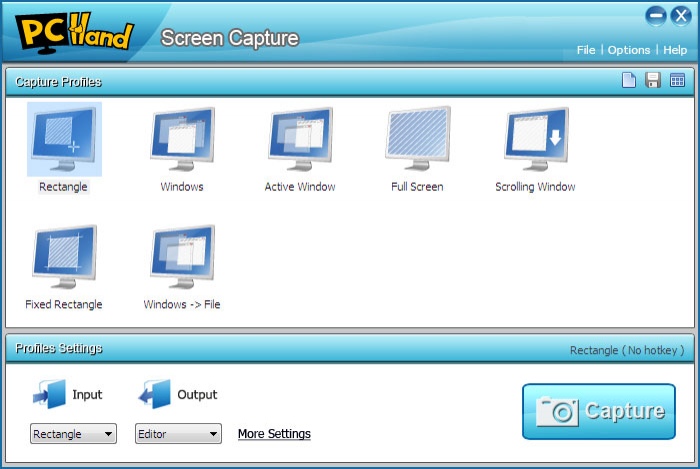
With PCHand Screen Capture, you will find capturing cant be any easier. It is excellent screen capture software, which allows not only capturing anything you see on the screen with flexible capturing profile, but also editing the captured images with the powerful build-in editor. Its easy to use, even for a novice!
This splendid screen capture software provides different capturing modes, including Capture Rectangle, Capture Fixed Rectangle, Capture Full Screen, Capture Windows / Project, Capture Scrolling Window, Capture Active Window. Besides, we furnish multi-choice for output for better saving your captured images, such as Image Editor, Clipboard, Image File, MS Word, MS PowerPoint and Email. If you are not satisfied with the captured images, the built-in Image Editor will do a great help! Its available for optimizing your images with professional effects, text, decorations, etc. No limited to only 7 profiles, you could create more for any capture possibilities according to your needs without any difficulties. For example, Capture Windows and automatically save as PNG format files.
About PCHand Screen Capture
This Screen Capture program is available in English. It was last updated on 29 September, 2026. PCHand Screen Capture is compatible with the following operating systems: Windows.
The company that develops PCHand Screen Capture is PCHand Software. The latest version released by its developer is 1.8.0.
The download we have available for PCHand Screen Capture has a file size of 4.2 MB. Just click the green Download button above to start the downloading process. The program is listed on our website since 2009-12-19 and was downloaded 85 times. We have already checked if the download link is safe, however for your own protection we recommend that you scan the downloaded software with your antivirus. Your antivirus may detect the PCHand Screen Capture as malware if the download link is broken.
How to install PCHand Screen Capture on your Windows device:
- Click on the Download button on our website. This will start the download from the website of the developer.
- Once the PCHand Screen Capture is downloaded click on it to start the setup process (assuming you are on a desktop computer).
- When the installation is finished you should be able to see and run the program.
Program Details
System requirements
Download information
Pricing
Version History
version 1.8.0
posted on 2009-12-19
1.Available to capture irregular area;
2.Fixed other minor bugs ;
